

Lots of Xiaomi device users who use Redmi phones or Mi phones are facing with “Don’t cover the earphone area” error.
This error is specifically seen on Xiaomi mobile phones and other Poco phones such as Redmi 9/9c, Redmi Note 9/9 Pro, Redmi 9a/9t, Redmi Note 8/8 Pro, Redmi Note 7, Poco X3/X3 Pro, Poco M3.
So, in this article you will know why don’t cover the earphone area error appears and how to fix it.
Reasons: Why “Don’t Cover The Earphone Area” Error Occurs?
These are the possible causes behind the occurrence of the error message on Xiaomi devices:
- Firmware update failure.
- Dust or debris around the Proximity sensor. Hence clean it.
- Bugs/Glitches in the device firmware (upgrade firmware).
- Or the Proximity sensor is broken which is unlikely. In such cases carry your phone to the service centre for a checkup.
Also Read: Recover Deleted Data From Redmi Note 12/12 Pro/12 Pro+
How To Fix Don’t Cover Earphone Area on Redmi Phones
Follow the below-mentioned solutions to fix and get rid of the error “Don’t cover the earphone area. To turn this feature off, press the Volume up button”.
Solution #1: Turn OFF Pocket Mode
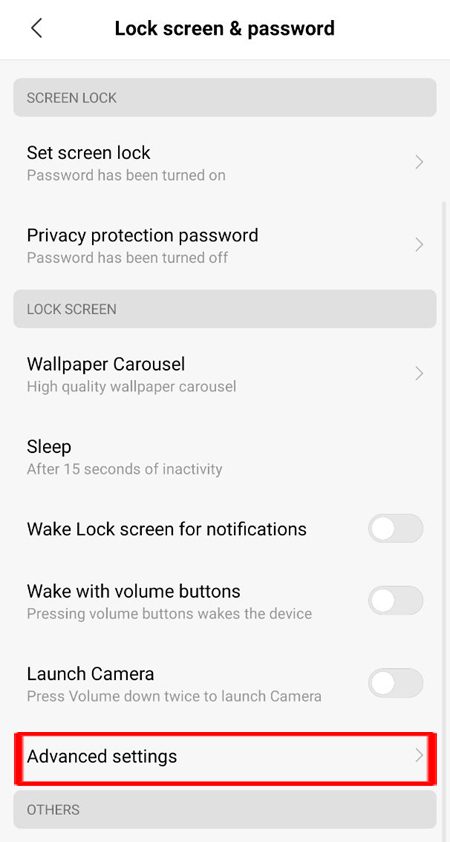
- On your phone, go to Settings.
- Scroll down and tap on “Lock Screen & Password”.
- Scroll down and tap on “Advanced Settings”.
- Now, toggle the switch to the OFF position next to “Pocket Mode”.
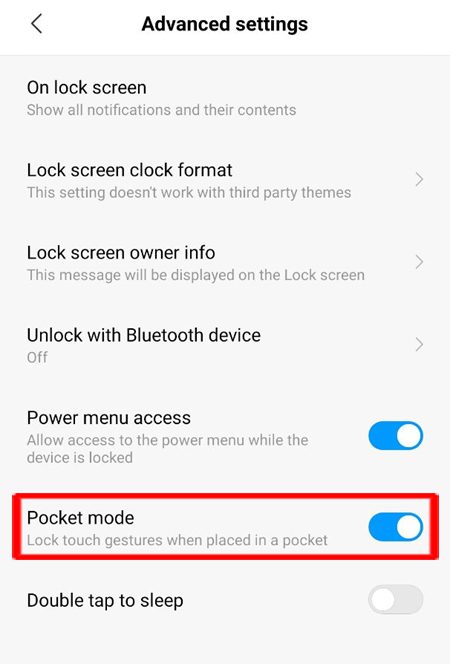
That’s It! I hope this will fix the problem.
Also Read: How Do I Get My Android Phone Out Of Headphone Mode?
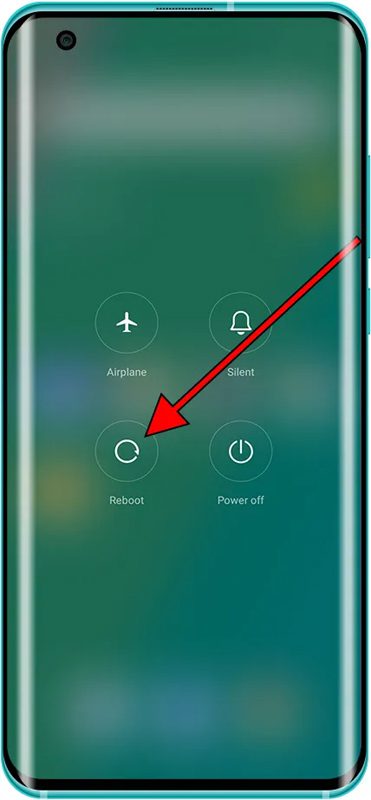
Solution #2: Restart Your Device
A simple restart can fix several minor and major problems of the device.
Hence, restart your phone and check if don’t cover earphone area error is solved or not.
Related Frequently Asked Questions [FAQs]
Question 1: How To Turn Off “Don’t Cover The Earphone Area” On Xiaomi Devices? Answer 1: Here is how to turn off Don’t cover the earphone area on Xiaomi devices: Go to Settings > Lock Screen & Password > Look for Pocket Mode and turn it OFF.
Question 2: Why Does My Phone Keep Saying Don’t Cover The Earphone Area? Answer 2: Your phone says it because there is a feature in your phone settings that is called “Pocket Mode”. It uses the Proximity sensor to detect if your phone is in pocket and it should not be unlocked by accident touches. So, when pocket mode is enabled and when you cover the earphone area and try to unlock, it will keep saying don’t cover the earphone area. It says so to ensure it is not in the pocket. To fix this issue you must disable Pocket Mode.
Question 3: How To Avoid “Don’t Cover Earphone Area” Error From Occurring Again? Answer 3: To avoid this issue from occurring again, you must keep pocket mode disabled. Also, make sure that there is no dust or debris around the proximity sensor area. And do not cover the headphone jack with anything.
Wrap Up
I hope that following the solutions mentioned in the article has helped you in fixing “Don’t cover the earphone area” error on Redmi phones.
If you have found this post helpful, then please share it as it can help others!
Please support us by subscribing to our YouTube Channel.
You May Also Like:
- How To Fix Redmi Note 10 Pro (Max) Front Camera Not Working
- Fix “Install_Failed_User_Restricted” Error Android Studio Using Redmi Devices
- How To Backup Xiaomi Mi and Redmi Phone Data And Restore Them Back
- Tips To Increase Battery Life of Xiaomi Phones – Improve Battery Backup In MIUI

Max Field is a founder of Recover Android Data. He is an Android lover and loves to write tips, tricks, fixes for errors, data recovery solutions and more related to Android. Provide Gaming Tips, Tricks, Game Error/Issues Solutions (PC/Xbox/PlayStation/Mobile). He has 11+ years of experience in this field.