

Learn Some Quick and Effective Solutions To Fix Samsung Galaxy Buds Making Static/Buzzing/Humming/Hissing/Crackling Sound!
After going through several community and forum sites I have seen that there are many Samsung Galaxy Buds users out there complaining that they start hearing a certain kind of weird, static, buzzing, humming, crackling noise from their Samsung earbuds. It starts randomly and starts to make noise in either right or left bud.
- Solution 1: Check For Software Updates For Earbuds And Connected Device
- Solution 2: Restart Your Earbuds
- Solution 3: Unpair Earbuds From Connected Device And Then Pair Them
- Solution 4: Reset Your Earbuds and Reconnect Them
- More Solutions To Fix Galaxy Buds Has Static, Humming, Buzzing, Crackling, Hissing or Any Weird Sound
- Solution 5 – Contact Samsung Support
Just check out the below practical scenarios!
Practical Scenario 1: Galaxy Buds 2 Pro Has Static Sound In The Left Bud
I got my earbuds yesterday and i noticed the battery was draining more than 40% in 1 hour. Also, the left earbud started making a weird noise like engines moving inside when i switched from ANC to ambient. After i blew it, it stopped. Then, today, the left bud started with some static sound when playing music. I blew it again, shook it and it stopped.
Idk if it is normal, idk if this happens and I have to reconnect my buds, idk if this battery drain is common… I’d like some tips and what to do (if I should return them).
Thanks!
Practical Scenario Taken From – Reddit
Practical Scenario 2: Galaxy Buds 2 Making Weird Buzz Sound In the Right Bud
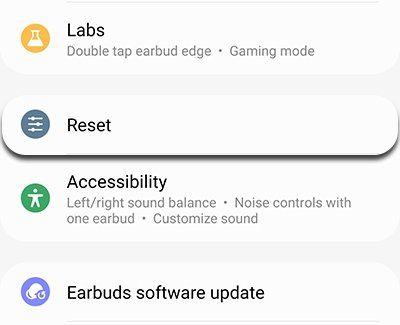
Hi everyone! So I just got my fresh pair of earbuds2, but unfortunately I think sth is wrong with one othem, whenever I try listening to anything in active noise cancelling mode or in ambient sound mode I keep hearing this weird buzzing sound in the right one. I can still hear it even when no media is playing. But that sound is magically gone when I switch off any noise controls. I have no idea if that’s a normal thing or some kinda bug…. and it would be a total loss if I couldn’t even use them fully with all of their features. I’ve tried resetting and unpairing my buds but none of it worked. Can anyone please tell me is there sth else I could do? Or should I try return them? Thanks in advance! Practical Scenario Taken From – Samsung Community This problem is really annoying and frustrating, given the price and expected best value of these ear buds. However, in this post I am going to provide effective solutions that you can follow to fix Samsung Galaxy buds has static/humming/buzzing noise. But before that let us know – Why Galaxy Buds Making Static, Humming, Buzzing, Hissing, Crackling or Other Weird Noise? No one likes to hear weird (static/buzzing/humming) noise in their earbuds. But unforeseen things happen, there are certain software/hardware or physical issues that can cause some interruptions in the sound quality of the ear buds. So, here are the reasons: So, those are the main factors dues to which your Samsung earbuds may make crackling/hissing/static/buzzing/humming noise. Anyway, now let’s move to the solutions to fix Galaxy earbuds have static/humming/buzzing/crackling/hissing/high pitched noise. Note: The below-mentioned solutions are applicable to Galaxy Buds 2 Pro/Galaxy Buds 2/Galaxy Buds Pro/Galaxy Buds Live/Galaxy Buds Plus/Galaxy Buds and all other Samsung Galaxy ear buds available in the market. Also, Menu options may vary depending on the earbud model and software version. Also Read: How To Fix Samsung Earbuds Only Playing In One Ear If your earbuds and connected devices’ software is not up-to-date, then update them. Make sure that your earbuds and phone or tablet software are updated to the latest version. If a problem occurs while you use a certain app such as Amazon music, make sure the app is also up-to-date. If you are using your buds with TV, laptop, computer, then make sure that these devices also have updated software. So, check and update those devices as well. Once, the earbuds restart, now connect and check if you hear any strange sounds. If you are using your earbuds to your phone/tablet, then here how to unpair: If you are using earbuds to Galaxy Wearable apps, then unpairing from Bluetooth will also remove them from the Wearable app. (Pic Credit: Samsung) Once unpaired, you have to pair them to both Galaxy Wearable app and Bluetooth. Here how to pair: If the pop-up message does not get displayed on your phone screen, then you can connect your buds using your Galaxy Wearable app. These are the methods: If no devices are added to the Wearable app, then you will see the initial setup screen instead. Here, you can select your earbuds from the list and then follow the onscreen steps to connect your earbuds. Also Read: [10 Quick Tips]: How To Increase Volume On Android Phone? If the buzzing, static, humming or any weird sound still occurs, then it’s time to reset your earbuds. Try to reset the buds once they are connected Galaxy Wearable app. It can fix the issue. Here how to reset the earbuds. (Pic Credit: Samsung) Once, the reset process gets completed, the earbuds will enter into pairing mode automatically. Once, you reset your earbuds, you need to connect them to your phone or tablet. You can follow the same steps mentioned in Solution 3, such as using the Connect pop-up message or the Galaxy Wearable app. If nothing works, then it is high time that you must contact Samsung Support, they may understand your problem properly and will help you with the right solution. So, those are the effective solutions that you can follow as they will help you to fix any kind of strange or weird noise such as static, humming, buzzing, hissing, crackling, high pitched noise that you are hearing in your Samsung Galaxy earbuds, either in your left or right buds. Please support us by subscribing to our YouTube Channel. Please share this article, if you found it helpful and useful, as it can help others. Max Field is a founder of Recover Android Data. He is an Android lover and loves to write tips, tricks, fixes for errors, data recovery solutions and more related to Android. Provide Gaming Tips, Tricks, Game Error/Issues Solutions (PC/Xbox/PlayStation/Mobile). He has 11+ years of experience in this field.
Causes: Why Galaxy Buds Making Static, Humming, Buzzing, Hissing, Crackling Noise?
Solution 1: Check For Software Updates For Earbuds And Connected Device
Solution 2: Restart Your Earbuds
Solution 3: Unpair Earbuds From Connected Device And Then Pair Them
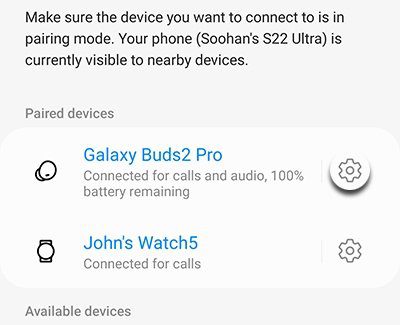
Solution 4: Reset Your Earbuds and Reconnect Them
You May Also Like:
More Solutions To Fix Galaxy Buds Has Static, Humming, Buzzing, Crackling, Hissing or Any Weird Sound
Solution 5 – Contact Samsung Support
Wrap Up
