
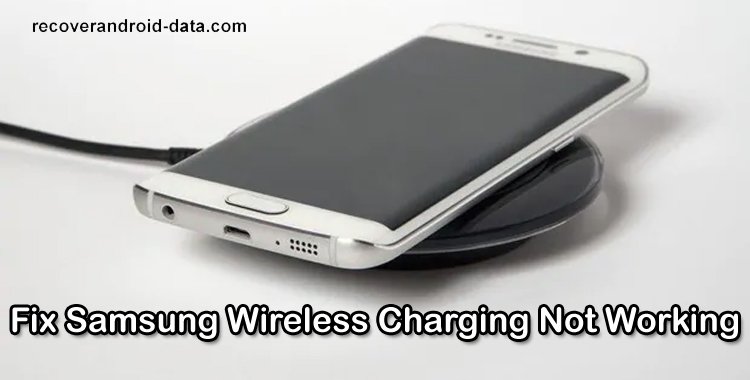
Your smartphone is very important for both professional and personal life and to run it your device needs battery life. In this time of technology, there are many accessories such as the wireless charger used for charging. It provides convenience for its users as you need to just lay down your phone on the surface to charge.
But this convenience sometimes turns into a nightmare when you realize that your phone is not charging with a wireless charger. If this is happening with you then here learn some different ways to fix wireless charging not working on Samsung phones.
Let us first look at some real user practical scenarios!
Practical Scenario 1: Fast Wireless Charge Not Working Samsung Phones
Practical Scenario 2: A Samsung S20 User Has Tried Many Solutions But Unable To Fix The Wireless Charging Problem
Like the above practical scenarios, there are many Samsung users who face this problem and wish to fix it.
Also Read: Tips To Extend/Improve Samsung Galaxy Battery Life
So, without any delay let’s move ahead to the different ways to fix wireless charging not working on Samsung Galaxy phones.
Note: All the methods that I am going to discuss will be applicable to all Samsung phone models that support wireless charging such as Samsung Galaxy S22/S20/S21/S21 Ultra/S7/S9/S9 Plus/S8/S8 Active/S10/S6/S20 FE/S10/S10 Lite/S10e, Galaxy Note 10 Lite/Note 10/Note 20 Ultra/Note 8/Note 10 Plus/Note 5, Samsung Galaxy A52/A12/A32/A21s/A50s/A40/A20, etc.
Video Guide: Fix Wireless Charging Not Working on Samsung Phone
Way 1: Use A Compatible Charger Cable
There are lots of companies that manufacture different types of charging cables that might be corrupted or cheap. In most cases, they are not compatible with your wireless charger which can cause the wireless charger to stop working. So, you must always try to charge your smartphone via an official charger set or other sets that come with Qi-Certification.
Way 2: Use Another Adapter
If the charging adapter is corrupted or damaged then it can result in Samsung wireless charging not working issue. It happens when you use the same charging adapter for a long time. It is suggested to use the Spare Cable if you have one. If your wireless charger works with another cable then make sure that the problem is not with the cable.
Way 3: Keep The Phone Properly On The Charging Pad
(Pic Credit: Samsung)
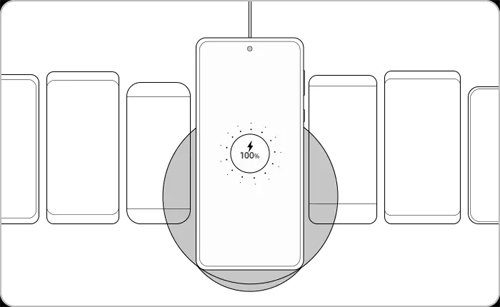
You should keep your Galaxy phone properly in right place. We suggest it because all the wireless chargers come up with pre-installed coil and you need to pair that coil with the phone properly. If it is not paired perfectly then your phone will stop charging wirelessly because when the coil is not paired with the device then the wireless charger completely disconnects from your phone.
Hence, to solve the charging problem, keep the phone properly at the center of the wireless charger and then check the charging problem with your Samsung phone is solved or not.
Also Read: How To Stop Phone From Overheating While Charging
Way 4: Use Qi-Certified Charger
(Pic Credit: Samsung)
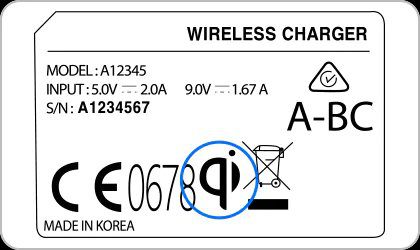
When you encounter this problem then you need to check that you have a pair of chargers with Qi-Certification. If it is not then purchase the new one or you can charge the phone through the spare wireless charger. If it is Qi-Certified Charger then you should move to the next method.
Way 5: Remove The Phone Case/Cover
Your Samsung wireless charger may also stop working if you are using a thicker phone case. Most of the wireless chargers are only compatible with a 3mm thickness cover. So, if your phone case is thicker more than 3mm then you will surely face the charging problem on Samsung phone. Hence, we advise you to remove the phone cover or any other device accessories such as metal objects, magnets or RFID cards, holders or credit card that comes between your device and the wireless charger and then try to charge it with wireless charger. If it is charging then change the phone cover or remove the device accessories.
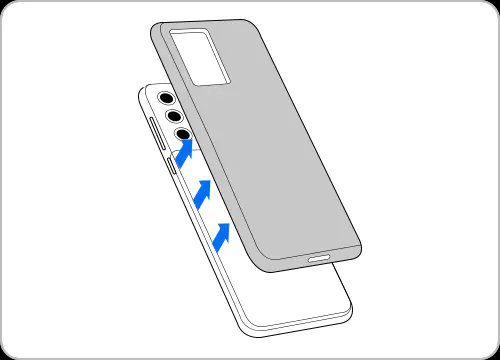
Remove Phone Cover/Case (Pic Credit: Samsung)
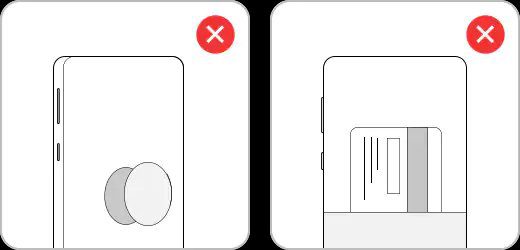
Remove Any Holder/Credit or Debit Cards or Any Other Objects (Pic Credit: Samsung)
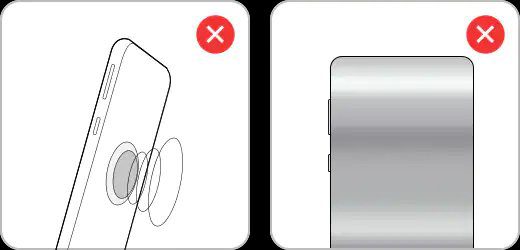
Remove Metal Case/Magnet Stickers (Pic Credit: Samsung)
Also Read: Fixed: Can’t Add Card To Samsung Pay On Samsung Phone
Way 6: Update Your Samsung Phone
If you have not updated your smartphone to the latest version of Android OS then it can cause this problem. So, check the latest update for your Android OS and if it is available then install it as soon as possible.
Below, learn how to install the latest version of Android OS for your Samsung device:
Step 1: Go to Settings app on your phone.
Step 2: After this, tap on Software Update.
Step 3: Now, your device will check the update for your phone.
Step 4: If the update is available then tap on Download and Install button to update your Android OS.

Way 7: Uninstall Corrupted Apps
Have you recently installed any app and thereafter your Galaxy phone is not charging wirelessly? If YES, then it can be possible that the app that you have currently installed is corrupted. And to solve the problem you need to uninstall that app. Once you uninstall the app link your phone with a Qi-Certified charger and check whether it is charging or not. If not, then follow the next solution.
Also Read:How To Solve “Firmware Upgrade Encountered An Issue” On Samsung
Way 8: Enable Fast Wireless Charging Mode
If your Samsung wireless charging is working but it is charging slowly then you can turn on fast wireless charging mode on your Samsung phone.
Samsung phones come with pre-installed Fast Wireless Charging in their premium flagship. So, if you have it then turn it on to fix the problem.
Below learn how to do this.
Step 1: Navigate to Settings and then hit on Battery & Device Care.
Step 2: After this, tap on Battery > More Battery Settings.
Step 3: Now, turn on Fast Wireless Charging.
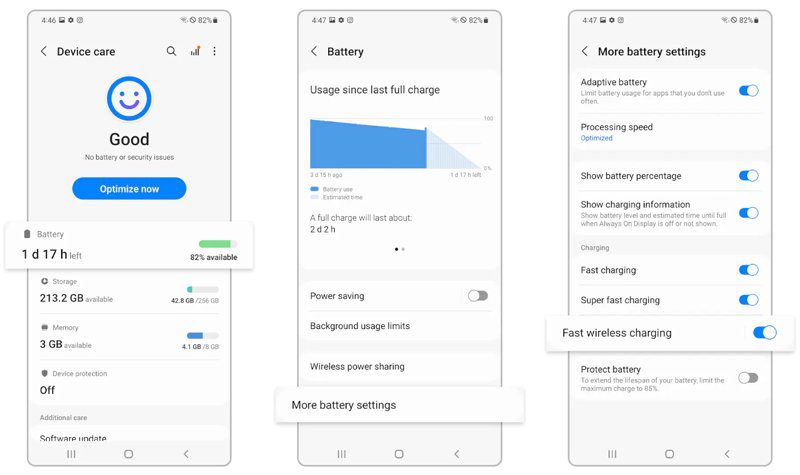
(Pic Credit: Samsung)
You May Also Like:
- How To Stop Games From Crashing On Android
- Skype Video Not Working On Android? Here How To Fix!
- Fix Wi-Fi Calling Not Working On Samsung Galaxy S20 (Plus)/S20 Ultra
- [FIXED] Android System WebView Update Problem
Way 9: Move The Wireless Charger
If you have kept the charger around many other electronics then try to move the charger to another place where there are no electronics available. Doing this will help the wireless charger to communicate with your phone when there is no interference around it. If changing the place didn’t work then you should try another solution.
Way 10: Turn On Daydream
You can use the daydream function that keeps your Samsung smartphone awake under particular circumstances. So, check it, and if it is not enabled then enable it to solve the problem that you are going through right now.
Below, follow the simple steps to turn on daydream on your Samsung phone.
Step 1: Open the Settings app on your Samsung phone.
Step 2: Then hit on Display.
Step 3: From there, go to Daydream.
Step 4: If it is off then turn it on.
Step 5: Next, tap on More at the top right corner of Daydream.
Step 6: Now, go to “Select when to daydream” in the new menu.
Step 7: Choose “While charging” to make sure your phone starts to daydream on your Samsung wireless charger.
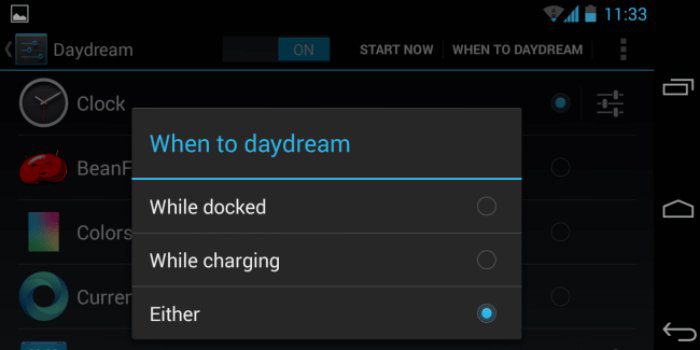
Way 11: Reset NFC
The NFC (Near Field Communication) on your phone makes many things easy but it can create problems in wireless charging. There, we recommend you to reset the NFC on your phone to solve the issue.
Go to the Quick Settings menu or wireless settings and turn off all your NFC services.
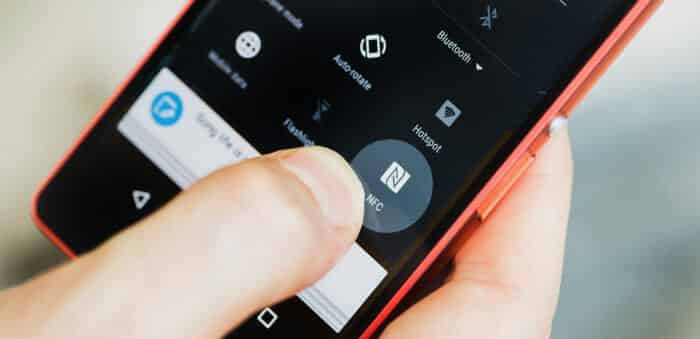
Keep it disabled for a few minutes and then turn off your phone. Once your phone is switched off completely, turn on your Samsung phone and NFC. Now, use the wireless charger to charge your phone.
Way 12: Check That Your Phone Is Not Overheated
If your phone is overheated then it can affect your phone’s performance and create problems while charging. If you used to play games for a long time or run various apps then your phone’s battery can overheat. So, in this case, close all the apps that you don’t use and then switch off your mobile and leave it to cool down. When your phone becomes normal then try to charge it with Samsung wireless charger.
Way 13: Try Charging Phone In Safe Mode
If your phone won’t charge with a wireless charger for no reason then it could be the corrupted third-party apps that are responsible for it. So, to confirm it, you can boot your Samsung phone into safe mode and then keep the phone in charging. If it is charging then it means that the 3rd party apps are blocking the functionality. And to fix it you need to uninstall the recently installed apps one by one and check if the problem gets solved or not.
Way 14: Dry Your Samsung Phone (If It Contains Moisture)
There are some water-resistant Samsung phones that won’t charge if the charging port is wet or contain moisture. Generally, this happens with a wired charger and the users receive “Moisture detected” error on their phone. But there are some users who have reported that this error also appears in wireless charging.
So, check that your Galaxy device is dry. If it is wet then dry it using a soft cotton dry cloth. You can also shake your phone to extract the water particles from the charging port.
Way 15: Check The Wireless Charger Performance With Samsung Members
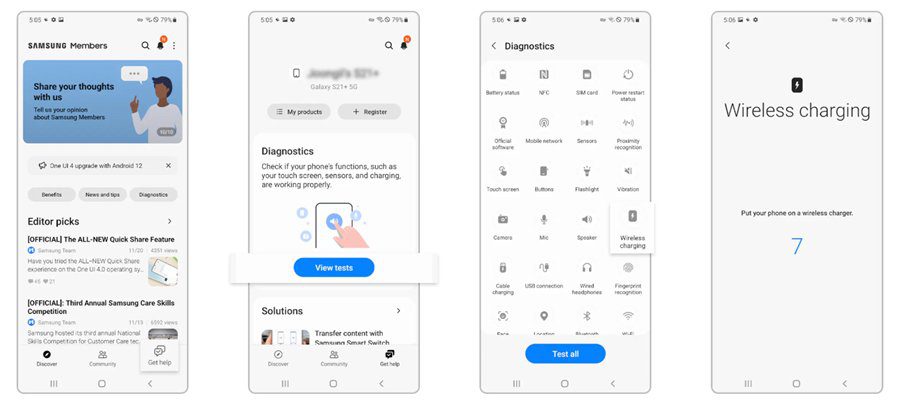
You can see your Galaxy wireless charger performance with Samsung Members app. When you keep the device in a wireless charger then it self-diagnoses the problem (if it has any) and shows the results.
Below, follow the steps to do the same.
Step 1: Launch the Samsung Member app on your Galaxy phone and then go to Get help situated on the lower right.
Step 2: Choose View tests from Diagnostics.
Step 3: Then, hit on Wireless charging.
Step 4: Now, follow the on-screen steps and keep your Samsung phone on top of the wireless charger.
(Pic Credit: Samsung)
Also Read: What To Do When Samsung Touch Screen Not Working After Update
Way 16: Repair Your Samsung Phone
If you have tried all the above methods but your Galaxy phone is still now charging wirelessly then your device may have some hardware issue or your Samsung wireless charger is broken. In both cases, you need to visit the local Samsung Service Center and get your Samsung phone repaired or replace the wireless charger.
Wrap Up
Wireless charging is convenient and hassle-free but sometimes it doesn’t work and the users get frustrated and they wish to fix it immediately. Above I have mentioned different ways that will help you to fix Samsung wireless charging not working on Samsung phones. We hope they will work and you can easily charge your phone wirelessly.
Please support us by subscribing to our YouTube Channel.

Max Field is a founder of Recover Android Data. He is an Android lover and loves to write tips, tricks, fixes for errors, data recovery solutions and more related to Android. Provide Gaming Tips, Tricks, Game Error/Issues Solutions (PC/Xbox/PlayStation/Mobile). He has 11+ years of experience in this field.