

Is your Roblox’s voice chat has been suspended for violating their community guidelines terms and services?
Don’t know why your voice chat has been banned for no reason?
Well, in this article you will know how to get unsuspended from Roblox voice chat.
Let’s start with a real user practical scenario!
Practical Scenario: Roblox Suspended Voice Chat For No Reason
roblox suspended my voice chat, how do i appeal for it they never stated the reason for the ban, nor if my suspension is permanent or not, help me 🙁 Source: Reddit
That is just one example. But there are many users out there facing such issues.
So, what does suspended voice chat in Roblox mean?
Also Read: Fortnite Guide For Beginners: 12 Tips for Your First Match
What Does Suspended Voice Chat In Roblox Mean?
(Pic Credit: Developer Forum | Roblox)
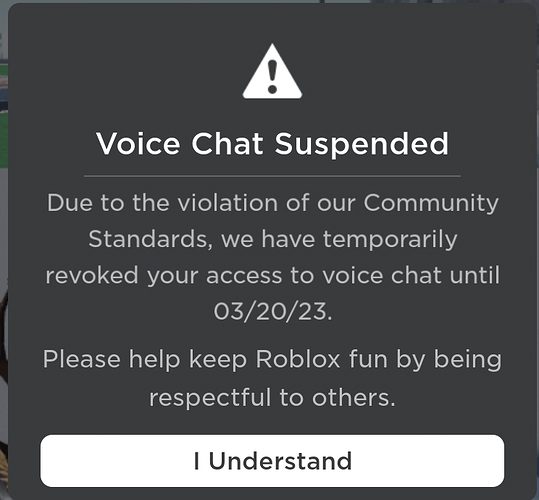
It means that you have been banned from using the chat features in Roblox temporarily or permanently.
Roblox’s voice chat feature allows you to send and receive messages in the app, similarly like you do in other messaging apps.
Accounts that break the terms and conditions on Roblox are basically gets banned. The ban could be temporary or permanent depending upon the severity of their violation.
However, the temporary bans usually last for 24hrs to up 3 days or 7 days.
Anyway, coming back to the topic, let’s find out how to fix “Your access to voice chat has been suspended for violating our community standards” and get rid of suspended from Roblox voice chat.
How To Get Unsuspended From Roblox Voice Chat
Since the suspension normally last for 24 hrs up to 72 hrs. It means that you have to only worry about when it has been more than that. However, in some cases, it could last up to 7 days.
Nonetheless, you must take it seriously, if your voice chat suspensions last more than normal on Roblox. Particularly, when your ban is marked as “Temporary” and hence you have to contact Roblox support team.
So, here we go!
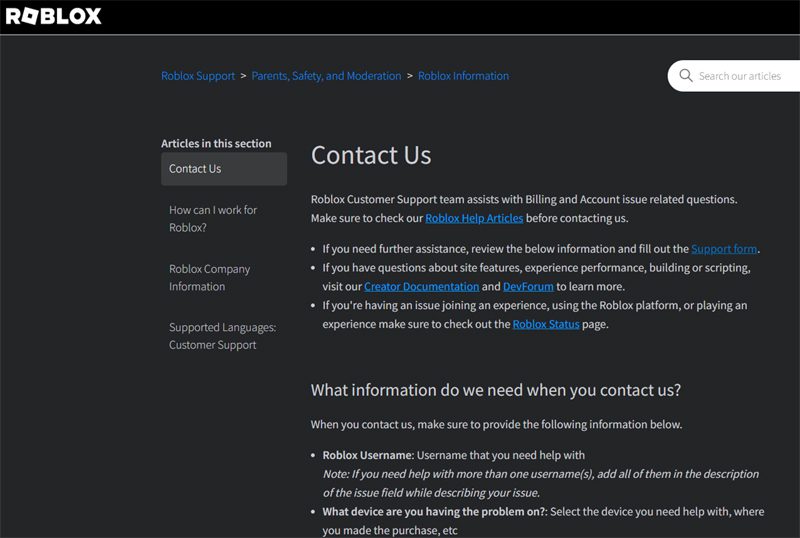
In order to unsuspend your voice chat, you have to contact Roblox and submit Roblox voice chat appeal.
While you appeal, make sure to state that you have been suspended by mistake and you have not violated community standards.
Step 1: Visit https://www.roblox.com/support.
Step 2: If you are not logged in, then login to your account.
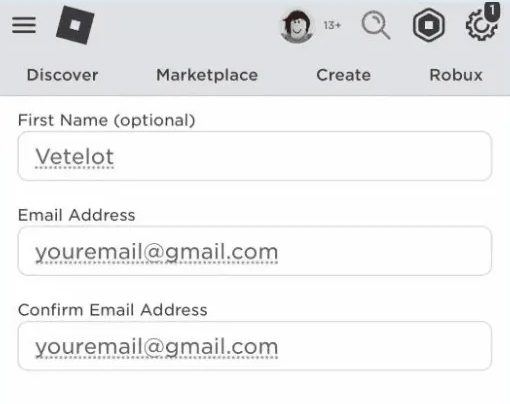
Step 3: Enter username, name and email.
(Pic Credit: Medium)
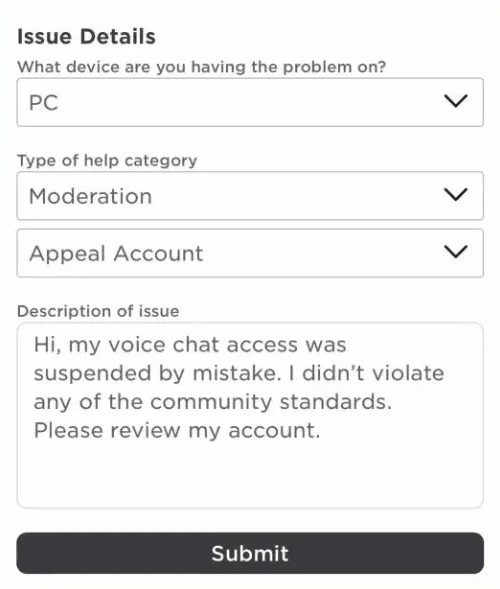
Step 4: Now, select the device on which voice chat has been suspended.
Step 5: Choose “Moderation” and “Appeal Account”.
Step 6: Now, describe in detail that voice chat in your Roblox account has been suspended by mistake and you didn’t violate the community terms and guidelines.
Step 7: Finally, submit the appeal. Roblox team will respond to you in 1-3 days. However, it can take more time than this for Roblox to review your appeal.
(Pic Credit: Medium)
If Roblox will find that your suspension was done by mistake, then they will email you saying that you have been “Unsuspended”.
Also Read: How To Fix Pokemon Go GPS Signal Not Found On Android
Related Frequently Asked Questions [FAQs]
Question 1: Why Roblox Voice Chat Suspended For No Reason? Answer 1: Roblox voice chat can be suspended when users break the community standards for a friendly environment. The moderation team reviews the gaming environment very carefully and if they found these reports serious, then they ban the voice chat. In most of the cases, they do not even tell the reason to the users.
Question 2: How Long Is Roblox Voice Chat Suspension Last? Answer 2: The duration for Roblox voice chat suspension last from 24 hrs to 3 days for upto 7 days. It totally depends upon the seriousness/severity of the community violations. However, some sources mentioned that 3 strike system can ban for 3-4 weeks after the third strike.
Question 3: Is Roblox Voice Chat Suspension Permanent? Answer 3: Voice chat ban or a spatial suspension is an admin action that moderators at Roblox can do to a player. If they find that a player is breaking the voice chat rules, then they can ban them from voice chat. The suspension can be temporary or permanent is simply based on the player’s action.
Wrap Up
To bring a level of satisfaction to the gaming experience, one can use the voice chat feature on Roblox.
But, when you find that your voice chat access has been suspended mistakenly, then in such case, you can follow the above-mentioned steps to appeal and regain your voice chat access.
If you have found this article helpful and useful, then please share it as it can help others!
Please support us by subscribing to our YouTube Channel.
You May Also Like:
- How To Fix Roblox Keeps Crashing On Android
- Minecraft Pocket Edition (PE) Lagging On Mobile: Fix It Now!
- Fix Call Of Duty Mobile Log In Issue Due To Authorization Error
- [Problem Fixed] Among Us Crashing On Android

Max Field is a founder of Recover Android Data. He is an Android lover and loves to write tips, tricks, fixes for errors, data recovery solutions and more related to Android. Provide Gaming Tips, Tricks, Game Error/Issues Solutions (PC/Xbox/PlayStation/Mobile). He has 11+ years of experience in this field.