
Is the power button not working on OnePlus 12 or 12R?
Many users face this problem on their OnePlus 12 phone and ask about what to do if the power button not working on OnePlus 12R/12.
In this guide, we have covered the possible ways to fix power button not working on OnePlus 12 or 12R.
So, if you are wondering why OnePlus power button not working and how to turn on your phone, then follow the mentioned solutions in this guide.
But before that, let’s see the common reason behind this problem so you don’t repeat the same mistake.
Why Is My OnePlus 12 Or 12R Power Button Stopped Working?
- Hardware Damage.
- Dust and debris around the power button.
- Software glitches/bugs.
- Manufacturing defects.
- Firmware issues.
These are some of the common problems behind this power button issue.
Now, let’s begin with the fixes.
Also Read: Solutions To Fix Green Line Issue on OnePlus Phone
How To Fix OnePlus 12 Or 12R Power Button Not Working
You should start with cleaning the dust or debris around the power button or update the software.
Fix 1. Ensure The Power Button Is Not Damaged
You should remove your back cover and check if the power button is not damaged, if you find the keys are loose or any physical damage, then you will face an unresponsive power button.
Fix 2. Try Removing Back Cover
If you are using a thick back cover for your phone, then it can be the reason for an unresponsive power button.
Remove it and check if it’s working fine or not and also clean if it contains dust.
Fix 3. Clean Power Key
Sometimes, you will see dust or debris around the power button that’s blocking the power button to work properly.
You should clean the power button once a week to avoid these kinds of problems.
Also Read: OnePlus Lockbox Recovery – Recover Data From Private Safe/Lockbox
Fix 4. Update Your Phone Software
Software glitches can cause any kind of problems on the phone, to avoid it, you need to update your phone software to the latest version.
Follow these steps to do so.
1: Go to Settings and tap on About device.
2: Tap on Check for updates, if any updates are available, then download it by following the on-screen instructions.
Check if the issue is fixed or not.
Fix 5. Uninstall Third-Party Apps
If you have installed any third-party apps recently, then it can also cause the power button to stop working.
So, uninstall the recently installed applications on your OnePlus 12R phone and check if the issue is fixed or not.
Fix 6. Change Power Button Settings
Sometimes, wrong-configured settings can also cause the power button not to work on the OnePlus 12R phone. In such a case, you need to change your settings accurately.
Follow these steps to do so.
1: Navigate to Settings and tap on Accessibility.
2: Go to Accessibility menu, then turn OFF Use service, if turned ON.
3: Head to Settings > Button & gestures > Press and hold power button.
4: Now, select the Power menu.
Now, check if the power button is working or not.
Also Read: How To Recover Data From OnePlus With Broken Screen
Fix 7. Enable Gestures Or Accessibility Features
You can use Gestures or Accessibility feature to wake your device. You can enable features like double tap to wake or swipe gestures.
These are the alternative methods to wake your OnePlus 12R or 12 without using the power button.
Open Settings and tap on Button & Gestures, from here you can enable and customize these settings.
Fix 8. Factory Reset Your OnePlus Device
In this workaround, all your phone’s data will be erased and the phone will get back to the default settings and can fix OnePlus 12R power button stopped working.
Make sure you have a backup of your phone.
Note: Backup your data before doing the steps, so you can restore the data later.
1: Open Settings and tap on System Settings.
2: Go to Back up and reset > Reset phone.
3: Select Erase all data and tap on Erase data.
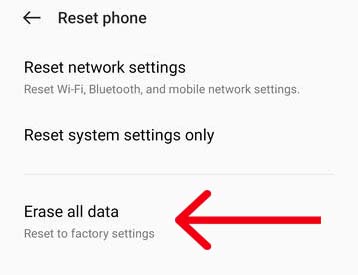
4: Tap Erase data, to confirm.
Now, check if the problem is solved or not.
Also Read: How To Unlock OnePlus With Broken Screen
Fix 9: Contact OnePlus Support
If none of the methods help, then you should contact OnePlus support or take your phone to the nearest OnePlus service center.
There are chances your phone has physical damage or some manufacturing problems.
If your phone is in the warranty period, then they will repair it for free or you can also ask for phone replacement.
Conclusion
The power button not working on your phone can be a factor in your day-to-day life because you can’t open your phone until you solve the issue.
So, we have covered the possible fixes and mentioned in this guide how to fix power button not working on OnePlus 12 or 12R.
I hope you found this guide useful, if it does, then do share it with others.
You May Also Like:
- How To Change Lock Screen Wallpaper On OnePlus
- How To Fix Someone Has Access To Your Screen on Android
- How To Fix “Blocked By Your IT Admin” on Android
- How To Enter Recovery Mode On Android Phone

Max Field is a founder of Recover Android Data. He is an Android lover and loves to write tips, tricks, fixes for errors, data recovery solutions and more related to Android.