

Is your YouTube ReVanced not working, not loading, showing connection error, keeps stopping, keeps buffering or stopped playing videos?
If so, then in this article, you are going to learn on how to fix YouTube ReVanced not working problem.
Let’s start with real user practical scenarios!
Practical Scenario 1: YouTube ReVanced Stopped Working After 20 Sec
ReVanced stops working after about 20 seconds It started out of the blue – was watching a video and after about 20 seconds the screen turns black and gives me the loading wheel. This happens in any video regardless if I’m on WiFi or not. Anyone have a fix for this? Source: Reddit
Practical Scenario 2: ReVanced Started Buffering And Stopping Videos
Revanced started buffering a lot today and stopping videos. How can I fix this? It’ll load some parts of the video just fine, but then suddenly stop. The video turns black and the white loading wheel appears. Sometimes it fixes itself by playing the few seconds before the buffer and then continuing, but other times it just keeps buffering. The only solution so far is just closing the app and playing the video from the history section. What’s up with this? How can I fix it? Edit: Forgot to add this, but my wifi is the same as ever. Source: Reddit
That was only just two examples, but there are many users out there facing such issues.
Now, let’s find out the solutions to fix ReVanced not working.
How To Fix ReVanced Not Working
Here we have mentioned 7 solutions and I hope that can help you to easily fix ReVanced not working, not loading, not playing videos, keeps stopping and buffering issues.
So, here we go!
Solution #1: Enable Spoof Player Parameter
- Go to ReVanced Settings > ReVanced Extended > Miscellaneous > Enable Spoof Player Parameter.
Solution #2: Try The Latest RVX and MicroG Builds
If you are using older version of the RVX and MicroG Builds, then it is recommended that you must try the newer and latest version of RVX and MicroG Builds.
Please check the download links at the end of the article.
Solution #3: Try Different Google Account
Log out from your current Google account and then use YouTube by signing in with another Google account.
Alternatively, use YouTube in incognito mode.
Solution #4: Clear Cache of ReVanced App
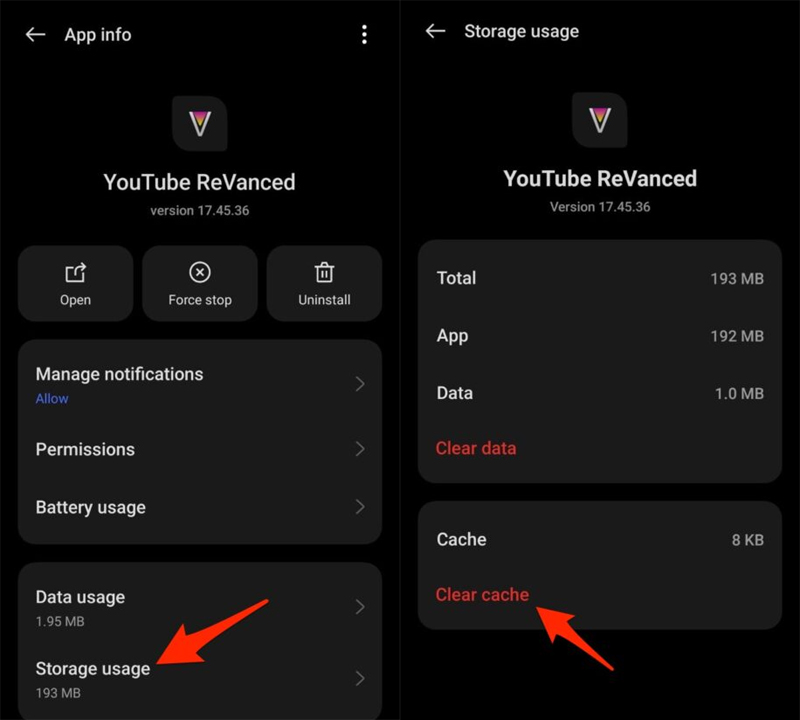
On Android, go to Settings > Apps > Apps Management > YouTube ReVanced > Storage Usage > Tap Clear Cache.
Also Read: [Fixed] “Unfortunately, YouTube Has Stopped” On Android
Solution #5: Clean Install RVX & MicroG
- Open RVX.
- Go to Settings > ReVanced Extended > Miscellaneous.
- Go to Enable Spoof player parameter > Enable Spoof app version and spoof of the app to the latest version.
Solution #6: Re-Install YouTube ReVanced
- First, uninstall the YouTube ReVanced from your device.
- Then download the YouTube v18.23.35 (nodpi) APK from APKMirror and install it.
Alternatively, you can simply download the YouTube v18.23.35 (nodpi) APK and re-install or update to the latest versions of ReVanced Manager (v 1.6.0).
Solution #7: Play Video Directly From The Channel
People generally play the video from the search result.
But here I recommend that you must go to the channel of the video and look for the video that you want to watch and then play it from there.
Download Links From u/TooMuchVanced on Reddit
RVX:
Revancify:
ReVanced
Youtube:
Wrap Up
I hope by following the solutions mentioned in the article will help you to fix YouTube ReVanced not working issue.
If you have found this article helpful and useful, then please share it as it can help others!
Please support us by subscribing to our YouTube Channel.
You May Also Like:
- [Fixed]: YouTube Vanced “Following Content Is Not Available”
- Global | Fixed YouTube Vanced Not Working on Android
- Global | How To Fix YouTube Keeps Crashing On Android
- How Do I Play YouTube Music In Background Without Premium?

Max Field is a founder of Recover Android Data. He is an Android lover and loves to write tips, tricks, fixes for errors, data recovery solutions and more related to Android. Provide Gaming Tips, Tricks, Game Error/Issues Solutions (PC/Xbox/PlayStation/Mobile). He has 11+ years of experience in this field.