


Is your Facebook not showing memories?
Are your Facebook memories not working?
If “Yes”, then you have come to the right webpage. Here we have explained effective solutions that will help you to fix Facebook memories not showing up.
Facebook is a social media platform that saves all your posts, posts that you were tagged in and anniversaries in Memories. And when a year is completed, Facebook shows those posts as Memories.
To see your Facebook memories, you can see them by clicking on the Memories tab.
Open Facebook app > Tap on Menu (3 horizontal lines) > Tap on Memories. If you don’t see the memories option then tap on “See More”.
You can also access your memories by visiting: https://www.facebook.com/memories/.
However, several users are experiencing problems or issues when they try to see memories on FB. When they clicked on the Memories tab, they were shown a message “No Memories Todays”.
Anyway, without wasting much time, let’s find out the solutions to fix memories not showing on Facebook.
How To Fix Facebook Memories Not Showing
Below are some of the effective solutions that will help you to resolve ‘Facebook Memories not showing up’ problem.
Fix 1: Logout and Login
- Just log out from your Facebook account. Open Facebook > tap on Menu (3 horizontal lines) > Scroll down and tap on “Logout”.
- Restart your device.
- Open Facebook and log in to your account.
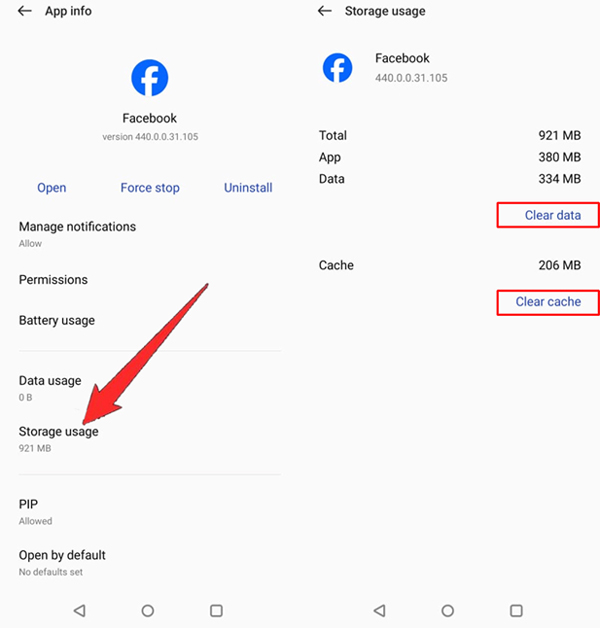
Fix 2: Clear Cache and Clear Data of Facebook App
- Open Settings app > Apps > All Apps.
- Look for Facebook and tap on it.
- Tap on Storage.
- Tap on “Clear Data” and “Clear Cache”.
Fix 3: Update Facebook App
- Go to Play Store.
- Search for Facebook.
- Tap Update.
Fix 4: Try Facebook Lite
- Open Google Play Store.
- Search for Facebook Lite.
- Tap on Install.
- Once installed, open Facebook Lite and log in to your account.

Fix 5: Try Older Version of Facebook
- First, uninstall Facebook from your device.
- Go to – https://facebook.en.uptodown.com/android.
- Click on “Older versions” and download an older version of Facebook (APK) and install it.
- Open Facebook and log into your account.

Wrap Up
I hope that following the solutions mentioned in this post has helped you in fixing the ‘Facebook memories not showing’ problem.
If you have found this article helpful, then please share it as it can help other users!
Please support us by subscribing to our YouTube Channel.
You May Also Like:
- How To Fix Facebook Back Button Not Working
- How To Fix Facebook Account Locked Due To Suspicious Activity
- How To Poke Someone On Facebook [Simple Steps]
- Turn OFF Facebook “Suggested For You” Posts On Android, iPhone

Max Field is a founder of Recover Android Data. He is an Android lover and loves to write tips, tricks, fixes for errors, data recovery solutions and more related to Android. Provide Gaming Tips, Tricks, Game Error/Issues Solutions (PC/Xbox/PlayStation/Mobile). He has 11+ years of experience in this field.