


Well, just like the Instagram app, Facebook also suggests relevant content to you by analyzing your activities such as Follows, Likes, etc.
These suggestions are helpful sometimes and sometimes it is not. Though many users do not disable it and many of them do not even know about this feature and they leave it as it is.
But, if you want to turn off the suggested for you posts on Facebook, then you can easily turn them off on your Android or iPhone.
But when you disable the feature “Suggested for you” posts, then you will not get helpful content that is available on Facebook and therefore you are limiting yourself from those content.
Hence, In my opinion, I would recommend you not to disable it, instead, you should look to disable/hide specific posts or pages that are suggesting irrelevant content or not useful content.
Anyway, you are wondering how you can hide or disable the suggestions?
Don’t worry! In this article, we provided the ways to turn off Facebook “suggested for you” posts on Android or iPhone.
You can follow the below-mentioned solution to turn it off on the iPhone/Android and get rid of it.
Also Read: How To Import Birthdays From Facebook To Google Calendar
Disable Facebook “Suggested For You” On Android/iPhone
Video Guide:
1. Hide The Post
Unfortunately, the Facebook app didn’t give an option and won’t allow you to disable it permanently. But keep reading the article because you can get rid of it by following some simple steps. Follow the mentioned below steps.
- Navigate to the Facebook app, and login to your account in which you are trying to disable it.
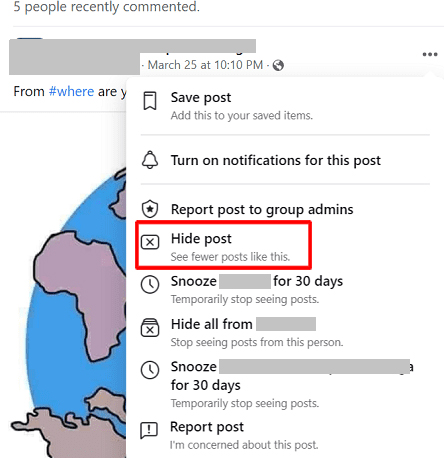
- Now, hit 3 dots from the Suggested for you post.
- Now, simply hit Hide Post, by doing this process it controls the post from suggesting that are relevant to it or you might no longer see posts that are relevant to it.
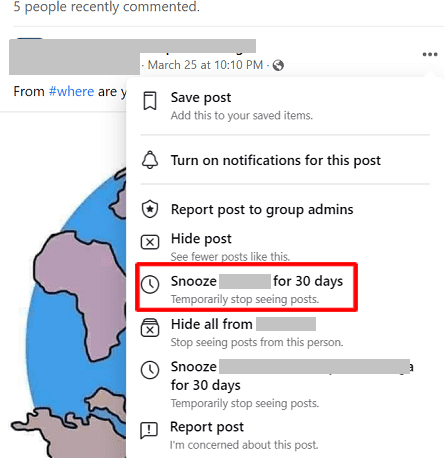
- If you wish to not see more posts from them, then you can temporarily snooze them using Snooze for 30 days.
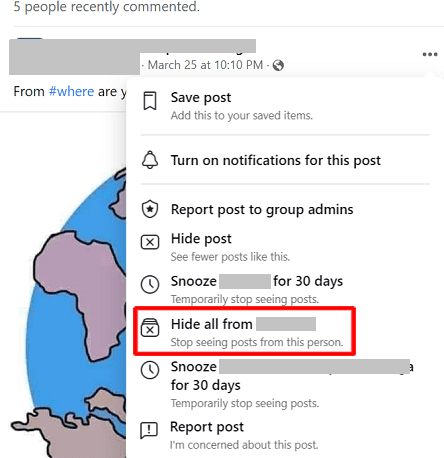
- You can also choose to Hide all, if you are not interested and don’t want to see more posts from them.
2. Enable And Disable Similar Page Suggestions For Your Page
Well, if you have a Facebook page and people visit your page, then they are able to see a “People Also like” section on the right of the page that lists similar content and pages as yours.
Keep in your mind that, once you disable this feature, then your page will also stop appearing in the recommendations when other people visit similar pages as yours.
These are the steps to follow.
- Open Facebook and choose on 3 horizontal lines.
- Now, select Pages, then go to your page.
- Now, choose More, then select Settings.
- Now, go to General, then select Similar Page Suggestion, then enable or disable it.
- At last, simply choose Save Changes.
You May Also Like:
- How To Fix Messenger Bubble/Chat Head Not Showing
- How To Fix Google Maps Keeps Rerouting on Android or iPhone
- If An Error Says “This Person Is Unavailable On Messenger”
- Turn OFF “Suggested For You” Posts On Instagram
3. If You’re Admin Or Owner Of Page Then Here What You Should Do
Well, if you are an owner or admin of a Facebook page, then you can turn off the “Suggested for you” feature. You can control the suggestion and recommend your post on other pages if you are an admin of the page.
If you disable it, then, when a user visits other’s posts and pages that are similar to yours, then your page will not recommend in others suggestion. So, choose wisely, what you should do.
These are the steps to follow to disable the feature.
- Navigate to the Facebook app on your device, then choose Pages.
- Now, select Settings, then click General.
- Now, look for Similar Page Suggestions, then turn it off.
- At last, Save changes.
Also Read: How To Recover Deleted Facebook Messenger Messages From Android Phone
4. Try Using FB (FluffBusting) Purity
If you prefer to use the Facebook using Chrome browser more than using the app, then you can go for the extension called FluffBusty Purity Chrome Extension.
You can use the extension in the Chrome to avoid Suggested for you, Game Spam, Sponsored Posts, Junk, it can also hide the ads.
As you all know, it is a third-party extension. So, I recommend you not to use it, because there is no guarantee that it will work properly and block all the sponsored posts or junks.
Also Read: [FIXED] “Unfortunately, Facebook Lite Has Stopped” On Android
Frequently Asked Questions Related To Facebook Suggested For You Posts [FAQs]
Answer. The suggestions are often recommended by friends and family members. For example, if your friends are in the same city or nearby your location, then it would recommend posts and pages.
Answer. Well, Facebook recommends posts to help you to discover different and new things on the platform and it depends on your previous interactions and activity.
Answer. Well, Facebook sees your activity and interactions such as Likes, Follows, and that content that you often look/watch, then it suggests similar posts that you may show some interest in it. This feature can help you a lot, because it may recommend such posts that you wish to watch. So, disabling this feature looks like missing an opportunity to watch interesting posts and pages. There are three different factors that influence Facebook to recommend “suggested for you” posts. Three of them are mentioned below.
Wrap Up
As you read the above-mentioned article, there are a few workarounds to turn off “suggested for you” posts on Facebook on Android and iPhone.
But also, keep in mind that there is no option to disable them permanently, instead you can hide posts or snooze them for 30 days.
If you are not interested in getting suggested for posts when using Facebook in Chrome browser, then you can download the extension and use it on your Chrome browser to avoid it.
I hope this guide has helped you on turning off the Facebook “suggested for you” posts on Android/iPhone. If it does, then do share as it can help others.
Please support us by subscribing to our YouTube Channel.

Max Field is a founder of Recover Android Data. He is an Android lover and loves to write tips, tricks, fixes for errors, data recovery solutions and more related to Android. Provide Gaming Tips, Tricks, Game Error/Issues Solutions (PC/Xbox/PlayStation/Mobile). He has 11+ years of experience in this field.