


Learn 12 Effective Solutions To Fix Android Phone Not Ringing For Incoming Calls!
Are you not able to receive calls on your Android phone because it is not ringing when someone calls you? I know this frustrates you very much and due to this, you miss important calls. But after reading this guide you will be able to fix this issue. In this guide, you will learn how to fix Android phone not ringing for incoming calls as well as why you are facing this issue on your Android phone.
- Solution 1: Restart Your Android Phone
- Solution 2: Check The Volume Settings
- Solution 3: Disable Airplane Mode
- Solution 4: Check Do Not Disturb Mode Is Not Enabled
- Solution 5: Make Sure Call Forwarding Is Not Enabled
- Solution 6: Boot Your Android Phone In Safe Mode
- Solution 7: Check If There Is Ringtone Problem
- Solution 8: Check Bluetooth Connection
- Solution 9: Update Your Android Phone
- Solution 10: Disable Wi-Fi Calling
- Solution 11: Factory Reset Your Android
- Solution 12: Repair Your Android Phone
- Related Frequently Asked Questions [FAQs]
Before you get familiar with the reasons and the solutions to fix it, let us first look at some real user practical scenarios so that you will know that you are not the only one who is facing phone not ringing on Android phone.
Practical Scenario 1: A User Is Asking Solutions To Fix Incoming Call Not Ringing Issue
Incoming call no ringing, how i solved?
Source: Tom’s Guide Forums
Practical Scenario 2: A User Need to Reboot The Phone Every Day To Get The Phone Ring
I have checked every setting recommended on this site and everything is the same yet I have to reboot my phone at least once a day to get it to ring. I’m at my wits end
Source: Android Central Forums
Like this, many Android phone users are not getting incoming calls rings due to some reason.
So, let us know why do you get missed calls/incoming calls but your phone doesn’t ring.
Also Read: How To Fix Missed Call Notification Won’t Go Away On Android
Why Is Your Android Phone Not Ringing When You Get A Call?
There are a variety of reasons due to which this can happen, making it difficult to pinpoint the exact culprit. But the most possible reasons for phone not ringing on Android are listed below.
- Maybe you have enabled the Airplane Mode or Do Not Disturb Mode.
- When you have enabled call forwarding.
- If your phone is physically damaged.
- Your ringer volume is down.
- When your phone is connected with Bluetooth.
- Your phone’s speaker port is clogged.
- Issue with a third-party ringtone.
Well, you have understood the reasons why does your phone not ringing for incoming calls.
Now, it’s time to learn the solutions to fix Android phones not ringing for incoming calls.
Solution 1: Restart Your Android Phone
You should first restart your smartphone, this will fix the bugs and glitches that can be causing your device from ringing when you get any calls.
To restart your Android phone, press and hold the Power button unless the Power menu shows up. From there, tap on restart/reboot option. You can also hit on Power Off option to switch off your phone completely. And after that, switch it on again by pressing and holding the Power button for a few seconds.

Also Read: How To Fix Google Pixel 6/6 Pro Screen Wakes Up Automatically/Randomly
Solution 2: Check The Volume Settings
On your Android phone, you get 4 sliders – call volume, media volume, ring volume, and alarm volume. Here, you need to adjust the ring volume. Call volume adjusts sound while you are on a call. You need to also make sure that the ringtone which you have set is high volume sound so that you can easily hear it.
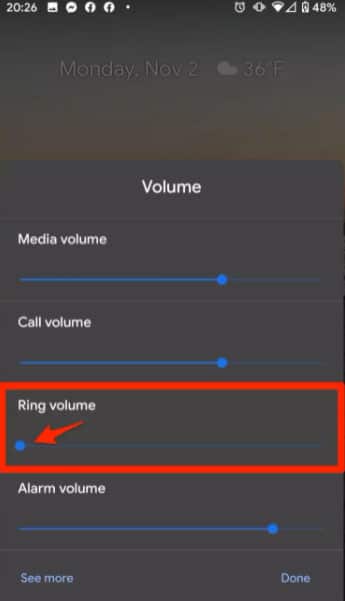
If you use a third-party ringtone, then try to use built-in options.
Solution 3: Disable Airplane Mode
When you enable airplane mode then all the calls directly go to voicemail. So, check that it is not enabled by going to Quick Settings menu. Or by going to Settings > Network & internet > Airplane mode. Now, check it is not enabled, if it is enabled then turn it off.

Also Read: Fix Wi-Fi Calling Not Working On Samsung Galaxy S20 (Plus)/S20 Ultra
Solution 4: Check Do Not Disturb Mode Is Not Enabled
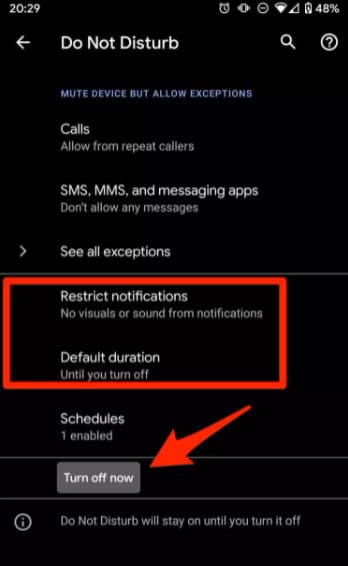
You need to also ensure that Do Not Disturb feature is disabled on your Android phone. If it is enabled on your phone then you will not get any notifications of messages, calls, etc. You need to also check that Do Not Disturb is not set to automatically at specific times of the day. For this, you can go to Settings > Sounds > Do Not Disturb > Turn off.
Solution 5: Make Sure Call Forwarding Is Not Enabled
If call forwarding is enabled on your Android smartphone then all incoming calls will be forwarded to voicemail. Some applications like Google Voice use this feature to forward voicemails. Check that, your calls are not enabled to forward to a third-party calling application such as Skype.
On older Android phones you will get call forwarding settings and on newer Android phones, you will get this in the app settings.
Follow the below steps to check this.
Step 1: Launch the Phone app.
Step 2: Then tap on 3 vertical lines to go to the app’s Settings menu.
Step 3: Now, hit on Calls.
Step 4: Choose Call forwarding.
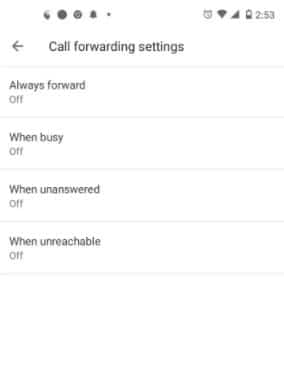
Step 5: Next, check that all the above-listed options are disabled.
Solution 6: Boot Your Android Phone In Safe Mode
The infected/faulty apps on your phone can also create problems due to which your phone will not ring when you get calls. You can check this by entering your Android device into safe mode.
Below, follow the steps to boot your Android phone into safe mode.
Step 1: Press and hold the Power button until you see the Power menu on the screen.
Step 2: Now, tap and hold the Power Off option on the phone’s screen.
Step 3: keep holding it till you get Reboot to safe mode messages on the screen.
Step 4: Hit on OK to boot your device into safe mode.

Now, if some apps pop up on the screen then uninstall those apps. Also, uninstall recently installed apps one by one and check whether the issue is fixed or not.
Solution 7: Check If There Is Ringtone Problem
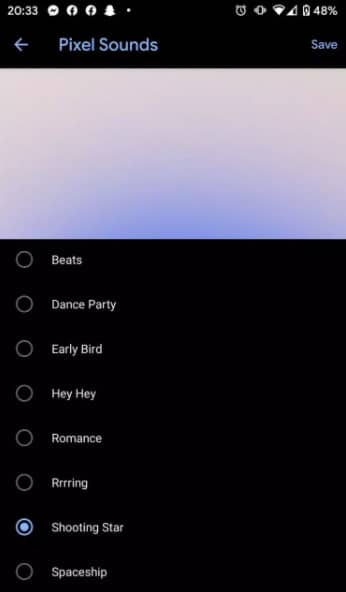
If you have downloaded a third-party app or bought a ringtone to use on your device and it is not ringing then it is caused due to a software bug. It is unable to hear the sound of the ringtone when someone calls you. You can set the pre-set ringtones and check whether you can get incoming calls ringtones or not.
Here, follow the steps to access default ringtones.
Step 1: Run the Settings app on your phone.
Step 2: Then choose Sound.
Step 3: Hit on Phone ringtone.
Step 4: Now, check the pre-downloaded ringtone and select anyone to hear.
Step 5: After selecting the desired ringtone, hit OK.
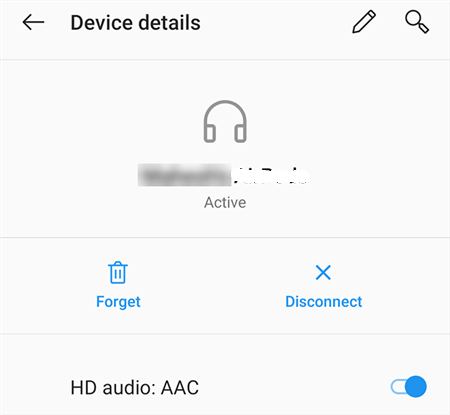
Solution 8: Check Bluetooth Connection
It is possible that you have connected your Android smartphone to a Bluetooth device and when someone calls you then it rings in the connected device. In this case, you need to disconnect your Bluetooth device from your phone.
Solution 9: Update Your Android Phone
Android brings its updates from time to time and when users don’t install those updates then they started facing various issues on their phone. Maybe you have also forgotten to install the latest update and due to this, your phone is not ringing.
So, you must check the update and if available then install the latest version of OS.
Here are the steps to do the same.
Step 1: On your phone, tap on Settings icon.
Step 2: Then scroll down and tap on System updates > Check For Updates.
Step 3: After that, hit on Download and install.

Also Read: [10 Quick Tips]: How To Increase Volume On Android Phone?
Solution 10: Disable Wi-Fi Calling
Sometimes when you are near a tower and your Wi-Fi connections are turned on then your carrier systems get confused about how to reach your phone. If the signal is not good then the tower may not reach you. If your phone is connected to Wi-Fi but there is a data capacity or firewall issue then the ringing signal may not reach your smartphone.
You may not know that your smartphone is using a Wi-Fi repeater or Wi-Fi calling. And on some smartphones, you will not get any indication of it.
So, in order to fix this issue, disable Wi-Fi and Wi-Fi calling.
Solution 11: Factory Reset Your Android
If you have tried all the above solutions and nothing has worked to fix the issue then you should factory reset your phone. Before you follow the steps to factory reset your phone, you should first backup your device’s data.
Now, follow the below steps to factory reset your Android smartphone.
Step 1: Go to Settings > General Management.
Step 2: Hit on Reset > Factory data reset.

Step 3: After this, tap on Reset > Delete All.

Solution 12: Repair Your Android Phone
If factory reset also didn’t help then it may be possible that your phone’s speaker is damaged due to which you can’t hear the ringing sound of incoming calls.
In this situation, you need to contact your phone’s manufacturer or the nearest service center from where you have bought it and give them to repair it.
You May Also Like:
- Samsung S10 Screen Rotation Not Working [Quick Fixes]
- How To Fix Front Camera Not Working On Android
- How Do I Get My Android Phone Out Of Headphone Mode?
- How To Reprogram and Reformat or Reset Android Phone
Related Frequently Asked Questions [FAQs]
Answer – Your phone will vibrate instead of ringing when you enable Silent Mode feature. To fix it or disable silent mode, you need to go to Settings > Sounds & Vibration and then turn off the settings.
Answer – If the downloaded ringtones are not ringing then there may be some problem with the downloaded ringtone. You can confirm it by setting a default ringtone.
Answer – You can force your phone to ring in various ways. You can boot your device into safe mode and factory reset your phone. The steps for both are listed above.
Answer – Not only silent mode causes your phone from ringing. There are other features due to which your phone will not ring. They are – airplane mode, call forwarding feature, software glitch, hardware issue, low volume settings.
Wrap Up
So, this guide has covered all the possible solutions to fix Android phone not ringing for incoming calls. Also, you knew why your Android phone is not ringing when you get a call. We hope you have fixed the issue and now getting incoming calls with ringing.
Please support us by subscribing to our YouTube Channel.

Max Field is a founder of Recover Android Data. He is an Android lover and loves to write tips, tricks, fixes for errors, data recovery solutions and more related to Android. Provide Gaming Tips, Tricks, Game Error/Issues Solutions (PC/Xbox/PlayStation/Mobile). He has 11+ years of experience in this field.