

Learn Some Effective Solutions To Fix Spotify Wrapped 2021 Not Working Or Crashing On Android!
Almost every people in this world like to hear songs according to their taste. And for listening to music, people use various types of apps. Among them, Spotify is one of them.
Spotify has provided a wrapped feature where you can check or listen the songs you have viewed the whole year. This is one of the best features of Spotify.
But there are some Spotify users who are complaining that their Spotify wrapped is not working on Android. If you are also one of them going through the same problem then read this article. Here, you will get effective solutions on how to fix Spotify Wrapped 2021 not working on Android.
- Solution 1: Update Spotify App
- Solution 2: Clear Cache And Data Of Spotify App
- Solution 3: Logout And Login Again
- Solution 4: Check Spotify Status
- Solution 5: Force stop Spotify App
- Solution 6: Uninstall And Re-Install Spotify App
- Solution 7: Use VPN Services
- Solution 8: Customize Animation Scales
- Solution 9: Use Android Repair Tool To Fix Spotify Wrapped Not Working On Android
- Solution 10: Factory Reset Your Android Phone
 Expert Tip: One of the effective ways to fix Spotify wrapped not working on Android is to use a professional and widely used Android Repair tool.
With the help of Android System Repair software, you can:
- Easily fix Spotify not working or crashing issue on Android.
- Also, fix other types of issues such as Android stuck in boot loop/recovery mode/black screen, Android System UI stopped working, etc.
- Only Support Samsung phones and tablets.
- 100% safe, secure, and easy to use.
Free Download Trial Version/Buy Now Android Repair Software To Fix Spotify Wrapped 2021 Not Working
 |
 |
Before you learn the solutions you should know what is Spotify and What is Spotify Wrapped.
What Is Spotify And Spotify Wrapped?
Spotify is an audio streaming services provider that was founded on 23 April 2006 by Daniel Ek and Martin Lorentzon. It is available for both Android and iOS. Users can use this app free or they can take a premium subscription to listen to music without advertisements.
You can use this app to create playlists to store your favorite music and you can search for new songs, bands, podcasts, and artists on the platform.
Spotify provides Spotify Wrapped feature where Spotify listeners can view the most memorable listening moments over the year and share it to social media platforms.
Also Read: Spotify Music Recovery: Recover Deleted Playlists from Spotify Music App
Why Spotify Wrapped Not Working Or Crashing On Android?
Spotify Wrapped crashing or not working issue can cause due to some reasons. They are as follows.
- Slow or unstable internet connection.
- Spotify app is not updated to its latest version.
- Corrupted cache data of Spotify app.
- If the Spotify app is down.
- Outdated Android OS.
- Low storage space.
How To Fix Spotify Wrapped 2021 Not Working On Android?
There are different solutions you can try to fix Spotify Wrapped 2022 not working on Android device. So, let’s first learn the basic tips to fix Spotify wrapped not showing up.
- You can simply restart your Android phone to fix this issue by pressing the Power key for a few minutes. Then tap on Restart/Reboot option on the screen. You can also tap on Power off option and then power on your phone after a few minutes.
- Check your internet connection which you are using mobile data or Wi-Fi. You can do this, by simply typing Speed test on any web browser and in the first result, tap on the run speed test.
- Put your Android phone in Airplane mode. To put your phone in Airplane mode, go to quick settings and hit on Airplane Mode icon to keep your device in Airplane mode. Or you can also do this using the settings app.
- Check the storage space on your Android phone. If the storage space is low then uninstall apps that you rarely use or you can delete unwanted data or backup them to other devices and delete them from your phone.
- If the new update for your Android OS is available then install the update. For this, go to Settings > About Phone > System Update > Check for update > download and install the update.
Now, we will move to the main solutions.
Solution 1: Update Spotify App
If you have not updated your Spotify app then you should update it immediately, this will fix the Spotify Wrapped not showing up on Android phones.
Here, follow the simple steps to update Spotify app.
Step 1: Open Google Play Store app on your phone.
Step 2: Then tap on your profile.
Step 3: Now, hit on my apps and games/manage apps and device option.
Step 4: Now, under Update section find Spotify app and tap on Update button.
Another simple way to update Spotify app is by opening Google Play Store app then entering the app name in the search box. And if the update is available it will show you Update button, simply tap on it to update the Spotify app.
Also Read: How Do I Play YouTube Music In Background Without Premium?
Solution 2: Clear Cache And Data Of Spotify App
Like every app, Spotify also stores cache data so that the app will open in less time and work effectively. But if the cache data gets corrupted then My Spotify Wrapped app won’t load on the phone.
In this case, you need to clear cache and data of Spotify app to fix Spotify Wrapped 2021 crashing on Android.
Follow the below steps to clear cache and data of Spotify app.
Step 1: On your Android phone, open Settings app.
Step 2: Then tap on Apps/Applications.
Step 3: Now, find Spofity app and tap on it to open.
Step 4: Next, tap on Storage.
Step 5: After that, hit on Clear Cache and Clear data button.

Solution 3: Logout And Login Again
If the Spotify Wrapped couldn’t load the page error occur on your Android phone then there can be some issues in your account. So, you can log out from Spotify app and then log in again to fix it.
Below, learn how to log out from Spotify app and then login again.
Step 1: On your phone, launch the Spotify app then tap on Settings icon.
Step 2: Then scroll down and hit on Log out.
Step 3: Now, confirm the process by tapping on Log out.

When you are logged out, log in again with your email address and phone number that you have used earlier. After this, check Spotify Wrapped is working properly or not.
Also Read: Spotify Not Working On Android Auto? Here Is The Real Fix!
Solution 4: Check Spotify Status
It is possible that the Spotify app was down and due to this Spotify Wrapped 2021 not showing personal tracks. So, check the status of the Spotify app by simply running the downdetector website in any web browser.
Here, you can select your region and check the status of all hours status of Spotify. If it is down then you need to wait until it gets fixed.
Solution 5: Force Stop Spotify App
When Spotify Wrapped Video Not Working on your Android device then you can force stop the Spotify app.
Here, follow the steps to do so.
Step 1: Open Settings app then hit on Apps.
Step 2: Then, hit on More and then on Show System Apps (on some phone models you don’t need to follow this step).
Step 3: Now, find Spotify app and tap on it to open.
Step 4: There, you will find Force Stop button, simply tap on it.

Solution 6: Uninstall And Re-Install Spotify App
You can also uninstall and then reinstall the Spotify app in order to fix Wrapped 2021 Stories skipping quickly on Android.
To uninstall the Spotify app, open Settings then tap on Apps. Now, tap on Spofity app and then hit on Uninstall button.
Now, re-install the Spotify app, but this time download the Spotify app from Spotify website on any web browser and then install it to your phone.
After this, log in with the same account that you have used earlier. Now, check Spotify Wrapped keeps crashing on Android devices 2021 is working well or not.
Also Read: How To Fix Spotify Podcasts Not Working On Android or iOS
Solution 7: Use VPN Services
There is a hipe of Spotify Wrapped that can result in connection server errors. So, to use the app services with other country’s proxy you can use VPN services.
You can use Cloudflare’s 1.1.1.1 VPN to bypass any server connection issues. You can use it free to fix Spotify Wrapped 2021/2022 not working on Android.

Once you install the app, open it and turn on the toggle from the main interface.
Solution 8: Customize Animation Scales
If there is any problem with the default animation scales then it can create problem for Spotify Wrapped fans. So, you need to make same customization to make them accessible with Spotify Wrapped.
Here, follow the steps to do the same.
Step 1: Open Settings app then tap on About Phone option.
Step 2: Now, you need to tap 7 times on “Build number” to turn on Developer Options.
Step 3: Now go back to device settings and scroll down to find developer options.
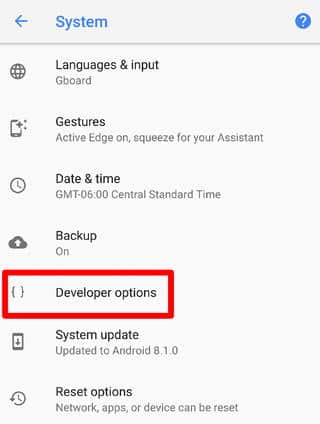
Step 4: Under Drawing section, modify the given scales to 3x:
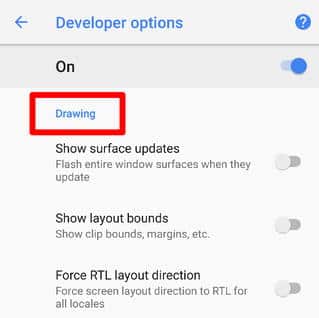
- Transition Animation Scale
- Window Animation Scale
- Animator Duration Scale
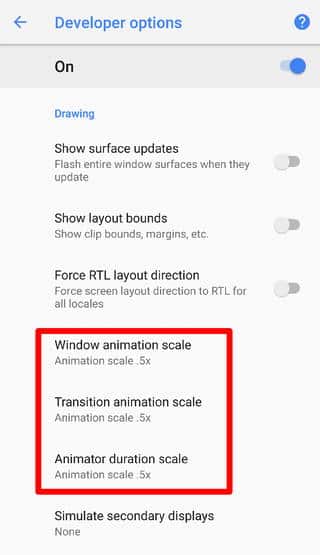
Step 5: Open the Spotify app and see the Spotify Wrapped slideshows.
Also Read: How To Fix Instagram Camera Not Working On Android
Solution 9: Use Android Repair Tool To Fix Spotify Wrapped Not Working On Android
If the above solutions get failed to fix the issue then there are chances that there is some problem in your Android operating system (OS). In this case, you can try Android Repair software to fix Spotify Wrapped not working or keeps crashing issue.
|
|
Note: Android Repair currently only supports Samsung phones and tablets.
Besides fixing Spotify keeps crashing issue, it also fixes other types of Android issues such as Android won’t turn on and off, Android OTA update failed, Play Store Stopped working, Samsung phone stuck at Samsung logo, and more.
Here, follow the complete steps on how to fix Spotify Wrapped 2021 not working on Android using Android System Repair tool.
Solution 10: Factory Reset Your Android Phone
Last but not least method to fix Spofity Wrapped 2021 Keeps crashing on Android is by doing a factory reset.
As you know that doing a factory reset will erase all data from your phone therefore you are recommended to backup all important data before applying doing this.
Here, follow the steps to factory reset Android phone if you can’t see the Wrapped list on your Spotify.
Step 1: On your Android device, open Settings app.
Step 2: Then, tap on About Phone.
Step 3: Now, hit on Backup & Reset option.
Step 4: Next, tap on Erase all data (factory reset).
Step 5: Lastly, tap on Delete all data.
Now, you need to wait until the reset process gets completed. After this, restart your phone and see if you can check your Spotify Wrapped.
You May Also Like:
- Fix Snapchat Not Working On Android
- Android Accessibility Service Not Working? Here How To Fix!
- Spotify Music Keeps Pausing: Here’s How I Fixed Mine!
- How Do I Get My Android Phone Out Of Headphone Mode?
Related Frequently Asked Questions [FAQs]
Answer 1 – You can see Spotify Wrapped 2021 on the Spotify app only. When you open the app, then on the homepage you will see a banner of Spotify Wrapped. But, if you don’t find it then follow the below steps: Step 1: Open the Spotify app. Step 2: If the banner is not working then hit on the search bar above. Step 3: Now, enter “Spotify:special:2021” and then you will get the result below. Step 4: Hit on it, then you will be taken to your Wrapped in the form of cards, such as Instagram stories.

Answer 2 – The main reason for your Spotify Wrapped story not working is that you have not listened to enough music. Some of the other reasons for this problem are – Spotify app is not updated, cache and data of Spotify gets corrupted, low storage space, etc.
Answer 3 – Yes, you can easily use Spotify Wrapped on Android. It is available for both Android and iOS devices.
Answer 4 – There could be various reasons due to which your Spotify will not show you your Spotify Wrapped. Some of the main reasons are-
Answer 5 – Some of the best playlists on Spotify are – Today’s Top Hit, Global Top 50, RapCaviar, Viva Latino, etc.
Answer 6 – You can easily access Spotify Wrapped by opening Spotify app. Then tap on the banner named “Your 2021 Wrapped”. Now, you will be sent to the Spotify Wrapped story.
Wrap Up
So, this guide has discussed some effective solutions on how to fix Spotify Wrapped 2022 not working on Android. Also, you have learned the reasons why Spotify Wrapped 2021 stopped working or crashing on Android. Try the solution one by one until the problem is fixed.
But, if there is any problem in your Android OS and due to this Spotify Wrapped not working on Android then you are recommended to try Android Repair software.
Please support us by subscribing to our YouTube Channel.

Max Field is a founder of Recover Android Data. He is an Android lover and loves to write tips, tricks, fixes for errors, data recovery solutions and more related to Android. Provide Gaming Tips, Tricks, Game Error/Issues Solutions (PC/Xbox/PlayStation/Mobile). He has 11+ years of experience in this field.