


Are you encountering this Instagram error:
“Your request is pending
Some accounts prefer to manually review followers even when they’re public. Let us know if you think we made a mistake”?
If so, then do not worry as this guide will show you some methods to fix “Your request is pending. Some accounts prefer to manually review followers” on Instagram.
Before we learn the solutions to fix this error message it is important for you to know the reasons why this error occur so that it can be easy for you to solve the problem.
Why Does Instagram Say “Your Request Is Pending”?
If you are temporarily blocked from the following user, you will get the “Your request is pending” error on Instagram.
This can happen because you have followed so many people at the same time and Instagram thinks that you are a spammer or bot.
Instagram has a “Flag for review” feature that is enabled for all users by default. This feature holds accounts for review in your followers list if these accounts are marked as spam.
This means that if your follow request is pending even though the requested user’s account is public, Instagram thinks that you are a spammer.
However, Instagram’s “anti-spam” feature is automated and your account can be marked as spam mistakenly.
How To Fix Error “Your Request Is Pending” On Instagram
“Your request is pending” error can be solved with the fixes that we are going to discuss below.
Fix 1: Turn Two-Factor Authentication
- Open the Instagram app on your phone and then tap on your profile photo located at the bottom right corner of the screen.
- After this, tap on 3 horizontal lines or the menu icon.
- Next, tap on “Account Centre”.
- Then tap on “Password and security”.
- Now, tap on “Two-factor authentication” and then choose your Instagram account.
- Next, follow the on-screen steps to enable the two-factor authentication feature.
After enabling this feature, try to follow someone to check whether the problem is solved or not.
Fix 2: Change Your Profile Photo
- Open the app and then tap on your profile photo.
- Next, hit on “Edit profile” button.
- Then tap on “Edit picture or avatar”.
- After this, tap on “Choose from the library”.
- Now, select a picture to set on your profile and tap on Done.
- After changing your profile picture, again try to follow someone and check whether the error is occurring or not.
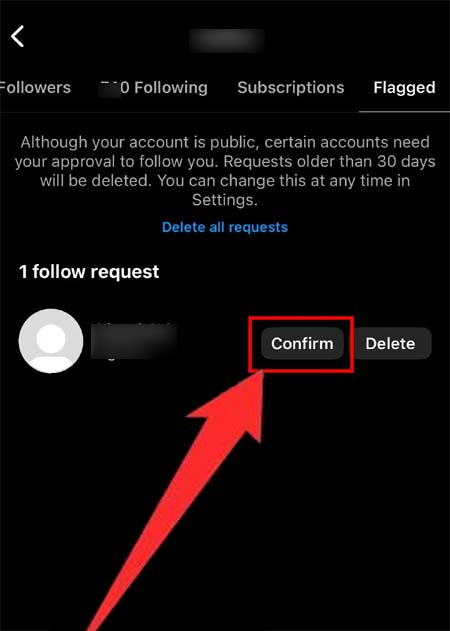
Fix 3: Ask The User To Accept Your Request
If the user to whom you have sent the following request is your friend or collogue then you can ask them to accept your request by following the below steps:
- Open the Instagram app and tap on your profile icon.
- Then hit on “Followers” at the top of the screen to check your followers.
- Now, scroll to the right of the top navigation bar and choose “Flagged”.
- Find the user, whose follow request you want to accept, and choose “Confirm”.
Fix 4: Connect To A VPN
- First force close the Instagram app.
On iPhone: From the Home screen swipe up from the bottom stop in the middle and look for the Instagram app. And swipe up to force close the app.
On Android: Tap and hold the Instagram app and then hit on the App info option. Next, tap on the Force Stop button.
- Now, download and install a free VPN app such as VPN – Super Unlimited Proxy from the App Store or Google Play Store.
- Open the app and connect to any free VPN (for example: France, Germany).
After this, open the Instagram app and try to follow someone again.
Fix 5: Wait For 1-2 Days
If your follow request is pending even though the account you have requested to follow is public, then it means that you are temporarily blocked from the following user.
If you have just created your account or it is 1-5 days old and you have followed too many users at the same time or if you have used a third-party tool or app then your account might be marked as spam.
In these situations, you need to wait for 24 to 48 hours before you send a new follow-up request to someone.
Fix 6: Contact Meta Verified Support
Note: Only Meta Verified subscribers can use this method to fix the “Your request is pending” issue.
- On your smartphone open the Instagram app.
- Then tap on your profile icon.
- Next, hit on three horizontal lines.
- Now, tap on “Meta Verified” and choose your verified profile.
- After this, tap on “Get support” and choose the issue you need to take support for.
- Now, follow the on-screen steps to submit your request.
Fix 7: Download An Older Version Of Instagram (Only Android)
- Uninstall the Instagram app from your Android device. For this just tap and hold the Instagram app and then tap on Uninstall option.
- After this go to https://instagram.en.uptodown.com/android.
- Choose “Older versions” and then download and install an older version.
- Now, open Instagram log in to it, and then try to follow someone.
Wrap Up
It could be an irritating situation when you want to follow someone on Instagram but, are unable to follow them due to the “Your request is pending” error. But now you don’t need to worry as we have outlined 7 different solutions above that will help you to fix “Your request is pending” on Instagram.
If this post has helped you then you can share it with your friends to help them.
You May Also Like:
- How To Fix “You submitted an appeal” On Instagram
- How To Remove Meta AI On Instagram
- How To Fix Flipside Not Showing/Missing on Instagram
- How To Fix “Your Comment Has Been Removed” on Instagram (2024)

Max Field is a founder of Recover Android Data. He is an Android lover and loves to write tips, tricks, fixes for errors, data recovery solutions and more related to Android.