
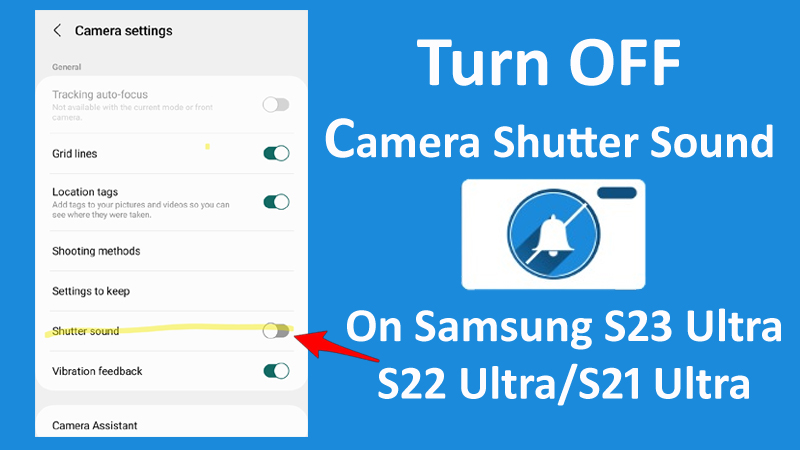

Cannot disable camera shutter sound on Samsung S23/S22/S21 series?
Not able to find out any option to disable shutter sound?
Are you looking to disable camera shutter sound on Samsung Galaxy S23 Ultra, S22 Ultra or S21 Ultra?
If “Yes”, then this is the right web page you are on.
In this article, I am going to show you the steps on how to turn off camera shutter sound on Samsung S21 Ultra, S22 Ultra or S23 Ultra.
Also Read: Haptic Feedback Not Working On Android? Here’s Is The Fix!
How To Turn Off Camera Shutter Sound On Samsung S23 Ultra, S22 Ultra or S21 Ultra
While you take pictures of a person, the sound of the camera’s shutter is the best way to let your subject know that they can stop smiling and it is safe to blink.
But in case, if you are taking photos in a place where you do not want your phone to make any sound, then this shutter sound of the camera can be an unwelcome interruption.
So below follow different methods to disable shutter sound on Samsung Galaxy S23 Ultra, S22 Ultra or S21 Ultra.
Method 1: Disable Shutter Sound Option In Camera App Settings
- Open Camera app.
- Tap on Settings icon.
- Scroll down and then toggle the switch to the OFF position next to Shutter sound option.

Also Read: Samsung Phone Display Is Black and White? Here How To Fix!
Method 2: Turn Off Shutter Sound Using Volume Down Button
If your phone is not having shutter sound option, or if you are not able to find it in the camera settings, then you can turn down your phone’s system volume.
Here how to do it:
- From your phone’s Home Screen, press Volume down button to bring up the Volume menu.
- Then tap on 3 dots at the top of the slider to open more volume settings.
- Now, using the slider, lower the system volume to the absolute minimum.
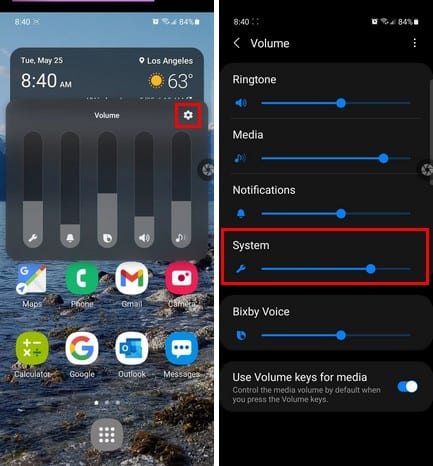
That’s It! Now, try taking photos and see if it disables the camera sound on your Samsung Galaxy phone. You will not be able to hear the shutter sound, if the system volume is all the way down.
Also Read: Fix Picture/Video Distortion Issue From A Samsung Phone’s Camera
Method 3: Turn Off Shutter Sound Using Mute Option In Camera Settings
- Open Camera app.
- Tap on Settings icon.
- Scroll down to the very bottom of the menu to find the Mute option. Toggle the switch to the ON position next to Mute option.

This will then prevent your phone to produce any more sounds when you click any new photos.
Also Read: What Is Bixby Routines & How To Use It On Samsung Phone
Method 4: Disable Camera Shutter Sound Via Bixby Routines
- Go to Bixby Routine and then select New Routine.
- Then under the App Opened, select Camera.
- Under Action, go to Accessibility > Mute all sounds and turn it ON.
- Now revert the same after closing the app. Then hit Save.
Wrap Up
So, those are four different methods that you can apply to turn off camera Shutter sound on Samsung S23 Ultra, S22 Ultra or S21 Ultra smartphones.
If you have found this post useful and helpful, then please share it as it can help others!
Please support us by subscribing to our YouTube Channel.
You May Also Like:
- How To Repair “Camera Failed” Error On Samsung Phone
- How To Fix Phone Camera Making Buzzing Noise
- How To Fix Front Camera Not Working On Android
- How To Fix Security Policy Prevents Use Of Camera On Android

Max Field is a founder of Recover Android Data. He is an Android lover and loves to write tips, tricks, fixes for errors, data recovery solutions and more related to Android. Provide Gaming Tips, Tricks, Game Error/Issues Solutions (PC/Xbox/PlayStation/Mobile). He has 11+ years of experience in this field.